Sub-Account Country Markups
Sub-account Country markups are applied to all Provider-Operators within a country served by the sub-account. They are limited to a single country. Sub-account Country markup settings override sub-account Global markups. Changing the markups of a single Provider-Operator within a country overrides the sub-account Country markups for that Provider-Operator only.
Sub-account Country Markups
The Set or change Country markup features has three options:
- % Markup: Percentage markup on top of parent account rates (your costs) applied to all Providers-Operators within this country
- Fixed price: Set a fixed price on Data (per megabyte) and SMS (per message) usage applied to all Providers-Operators within this country
- BLOCK: All Providers-Operators in this country are blocked and SIMs cannot consume any connectivity services
- Delete all Country markups: Removes all Country markups and single Provider-Operator markups within the country and reverts them to the sub-account Global markups (that apply in all countries)
View Country Markups Settings
To view the country markups, do these steps:
- Select Rates & fees from the sidebar menu.
- Click the Connectivity Rates | Select Account
- Click Select Country and select the countries whose connectivity rates you want to view
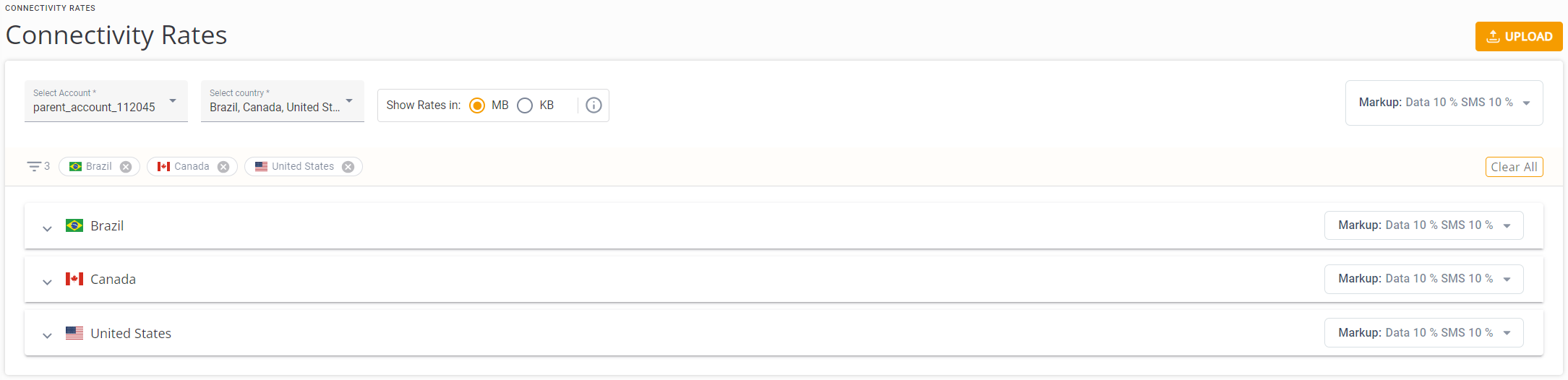
The Sub-account view shows the selected countries in the page header and the hidden Rate tables of the countries selected:
Change Country Markups
To change the country markups, do these steps:
- Go to the right side of the Country Rates table to view the Country markups currently in force in that country. By default, the Country markups inherit the sub-account Global markups.
- Click the Edit icon in the Country Markup display. The Set/Change country markups settings are displayed.
- Select % Markup.
- Modify the Data Markup and SMS Markup fields as required.
- Click Save. The new markups override those of the sub-account Global markups and are applied to all Providers-Operators in this country (only).
TIP: The Country markups for this country are changed and the new markups appear in the Markup indicator on the right side of the Country header.
Change Country Markup to Fixed Price
To set or change Country markup to a Fixed Price:
- Go to the right side of the Country Rates table to view the Country markups currently in force in that country.
- Click the Edit icon in the Country Markup display. The Set/Change country markups settings are displayed.
- Select the Fixed Price option. The Fixed Price fields for Data and SMS usage are displayed.
- Select the Currency, then set the Data MB Priceand SMS Price.
- Click Save. These fixed prices override the Global Markups of the parent-account and are applied to all Providers-Operators in this country (only).
TIP: The sub-account Country markups for this country are changed to fixed prices, and are displayed in the Markup indicator on the right side of the Country header:
Block all Providers-Operators
To block all Providers-Operators in this country:
- Go to the right side of the Country Rates table to view the Country markups currently in force in that country.
- Click the Edit icon in the Country Markup display. The Set/Change country markups settings are displayed.
- Select the Blocked option.
- Click Save. All Providers-Operators in this country are blocked and lose their connectivity.
WARNING: There is no confirmation you initiate a block action.. The blocking all Providers-Operators in this country is initiated immediately when you click Save.
Restore Connectivity to a Blocked Country
You can restore connectivity to a blocked country with two methods:
- Set/Change Country Markups and set either % Markup or Fixed price for the country
- Delete country markups: Restore Global Country Markups to all Provider-Operators in this country